

We rely upon our smartphones to take photos at events, on vacation, or just walking around town. The convenience of our mobile devices make them perfect for such occasions, but when we review our photos, the results can be less than desirable. Regardless of your experience, you can make your smartphone photos look like a professional photographer took them by using light, composition, and depth of field. Let me walk you through these techniques to achieve better smartphone photos that will you will love to show people.
Light the Subject
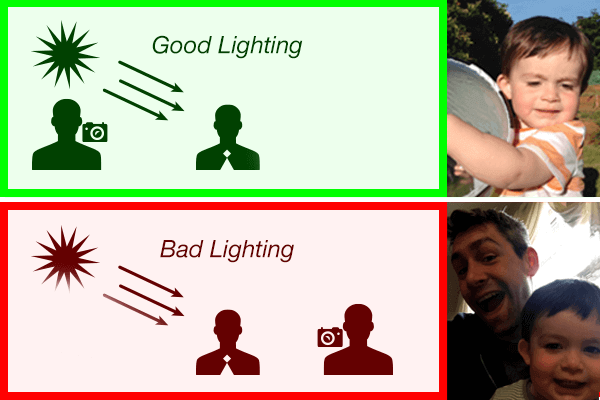
To achieve better lighting in photos, make certain that the sun or incandescent light is located behind you and shining directly upon the subject matter. This will provide good exposure in the photo. It is always easier to go back in a post-production application like Photoshop to darken areas of a photo. That way you will not remove any of the pixel detail from a photograph. Increasing the exposure on a photo will introduce image blowout into the lighter (near white) areas. Image blowout occurs when the lighter areas become pure white, creating a complete loss of color in those pixels which removes the image detail. The same thing can occur inside the shadows of a photograph when they become pure black.

Another way in which you can use lighting to your advantage is through the use of sharp contrast in the light and dark tones (shadows). Not to be mistaken with bad lighting, this intentional use to contrast on or around the subject can add a sense of drama or intensity to a picture. When used in a black and white photo, it can bring about a style reminiscent of the noir movement.
Composition
The way in which a scene or subject is arranged can add visual appeal inside a picture. By aligning objects or points of interest along hidden lines within a photograph give an implied sense of structure to the photo .
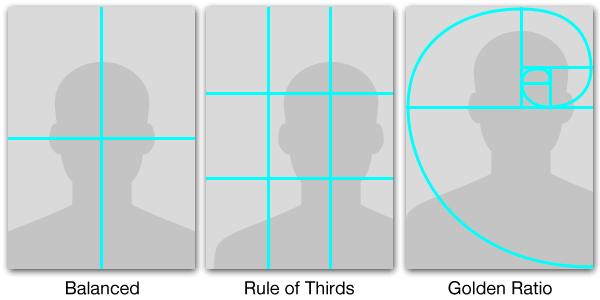
There are three common grids that photographers use within their photo compositions. They are the Balanced, Rule of Thirds, and Golden Ratio grid. A Balanced grid is one horizontal and vertical grid line through the center of the photograph. This divides the photo into four equal quadrants. The Rule of Thirds grid consists of two horizontal and vertical lines that divide the photo into nine equally sized boxes. While the Golden Radio grid is based upon the Golden Rectangle (1:1.618) which creates a spiral arch similar to the spiral of a sea shell. This grid is often found in nature and creates a focal point in one-third of the picture. Grid overlays can be turned in most smartphone camera applications either under the settings or menu options. For more about grids, read my post on the Elements and Principles of Design.

These grids can be used symmetrically or asymmetrically when composing a shot. A symmetrical composition is when the subject or scene are equally positioned, giving the photo a sense of visual balance. While an asymmetrical composition will be visually weighted to one side or area of the photo.
Depth of Field

Another way to bring more visual interest and help guide the viewer’s eye through a photograph is with Depth of Field. Depth of Field consists of bringing either the foreground or background into focus while pushing the other out of focus. This stylistic technique can be used to create atmosphere, a sense of spatial relationships, and help guide the viewer’s eye to a focal area in a photographic composition. Most smartphone camera apps allow you to set a focal point by tapping on the screen in the desired area of the photo before the photo is taken.
By using these three techniques together, you can quickly improve the photographic results achieved with your smartphone’s camera. Let us know if you have any techniques or equipment you like to use to help improve your smartphone photos.